About the PC Optimizer
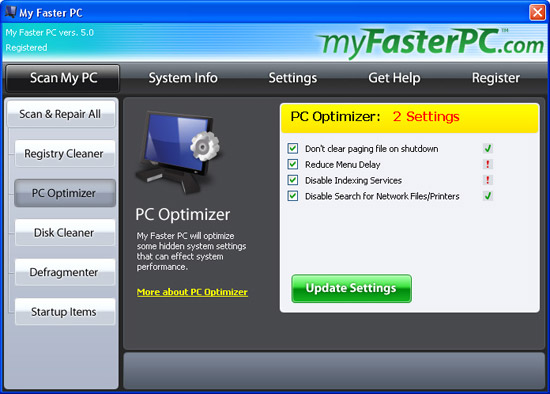
PC Optimizer scans your system's settings and configuration to determine which settings we can optimize for improved performance. Just go to the PC Optimizer tool to see what settings can be optimized, and click "Update Settings" to optimize them.
About the Settings
Don't clear paging file on shutdown: The paging file is an extension of your PC's physical memory. If you don't have enough real memory installed, your computer will create a paging file on your hard drive to hold this extra data. Usually, when you shut down, the paging file is deleted. By turning this setting off, you can help speed up shut down time. The paging file will be written over when your computer next accesses it. Note: If you access highly secure data on your PC, you may not want to disable this setting.
Reduce Menu Delay: This setting can help speed up your Start Menu's performance by removing the built-in delay.
Disable Indexing Services: This setting can help speed up system performance by turning off the indexing service that crawls through all your files to create a search index.
Disable Search for Network Files/Printers: This setting can help your Explorer windows open faster when browsing files by turning off a process that can slow down window performance.
How to Revert Settings
To revert to your original settings, uncheck all the PC Optimizer checkboxes and click "Update Settings."
